
In modern precision manufacturing, the combination of Heidenhain CNC controls and MQTT is playing an increasingly critical role in IT/OT convergence. Heidenhain controls – particularly the TNC series (TNC 640, TNC7, iTNC 530) – are widely recognized for their precision and reliability. They are deployed worldwide on milling machines from leading builders such as Hermle, DMG Mori, and Starrag. MQTT, in turn, provides the event-driven, scalable messaging layer between OT and IT. As a result, the demand for a reliable Heidenhain to MQTT Integration continues to grow. Moreover, this integration is becoming increasingly important in the context of the Industrial Unified Namespace (UNS) architecture. The following step-by-step guide walks through how to successfully implement it.
Integration Options for Heidenhain and MQTT
There are three fundamental approaches to connecting a Heidenhain CNC control to an MQTT broker: using a gateway, leveraging the OPC UA interface of newer control generations, or accessing machine data directly via the DNC interface based on the LSV/2 protocol. The right approach depends on the installed control generation, the specific use case, and the existing IT/OT infrastructure.
Option 1: Integration via Gateway
Gateway-based integration is the most widely used approach for connecting Heidenhain controls to MQTT. The gateway acts as a protocol bridge between the CNC control and the MQTT broker. It communicates with the Heidenhain control via the DNC protocol (LSV/2, TCP port 19000) or – for newer controls – via OPC UA. The gateway then reads the relevant machine data, transforms it into MQTT messages, and publishes them to the broker. This approach is particularly well-suited for brownfield installations, since it requires no modifications to the CNC configuration and is compatible with virtually all TNC generations.
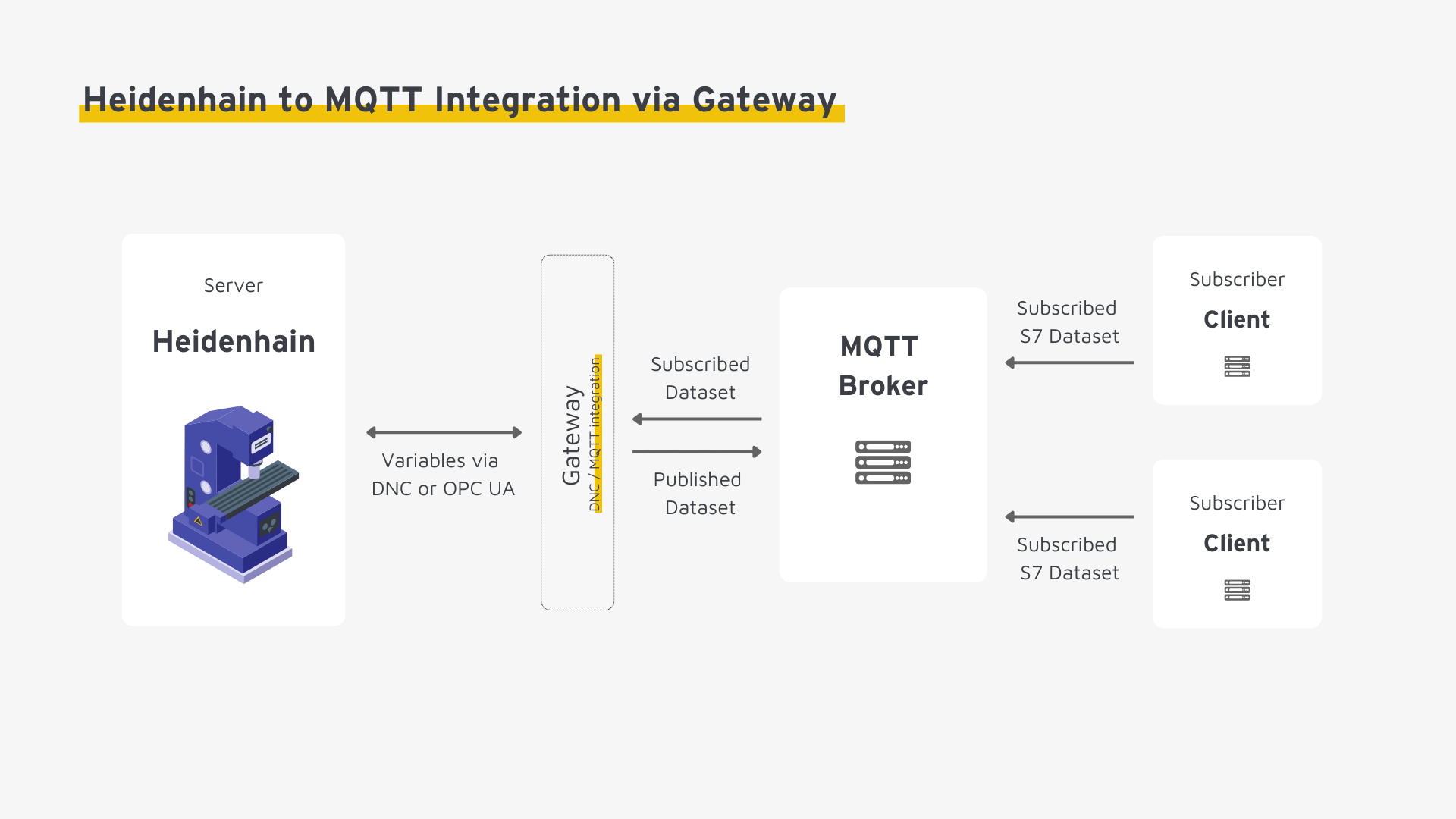
Option 2: Integration via OPC UA
Newer Heidenhain controls – notably the TNC7 and select TNC 640 versions – expose a native OPC UA server interface. Where this interface is enabled, it provides a standardized foundation for connecting Heidenhain to MQTT. In practice, the OPC UA-to-MQTT bridge is implemented in two ways: either through a gateway that reads OPC UA and publishes to MQTT, or natively via OPC UA over MQTT. Detailed guidance on this integration path is available here.
Option 3: Integration via DNC / REST API
For specialized scenarios or direct programmatic access, the classic DNC interface based on the LSV/2 protocol (TCP port 19000) remains available. It is supported by virtually all Heidenhain TNC controls. Additionally, newer platforms such as the TNC7 expose a REST API. However, both options require custom development effort to implement the MQTT publishing logic. They are therefore rarely the pragmatic choice in brownfield environments.
Step-by-Step Guide: Heidenhain to MQTT Integration via Gateway
The following steps walk through the process of connecting a Heidenhain CNC control to an MQTT broker using a gateway.
Step 1: Prerequisites and Infrastructure Assessment
Before any configuration begins, all systems involved must be verified as operational. In addition, the necessary access credentials and permissions must be in place. This step establishes the foundation for a stable Heidenhain to MQTT Integration.
- Select a gateway: Ensure the gateway natively supports the Heidenhain DNC protocol (LSV/2) and/or OPC UA, as well as MQTT. Furthermore, evaluate compatibility with other systems in your OT/IT landscape (e.g., additional controllers, ERP, MES). Confirm that required security capabilities (TLS, authentication) are covered. Depending on the use case, additional requirements may apply – such as redundancy or horizontal scalability.
- Verify infrastructure readiness: Confirm that both the Heidenhain control and the MQTT broker are fully operational. Moreover, set up a dedicated test environment early – it allows you to validate configuration changes in isolation without any risk to the production environment.
- Configure the network: Adjust your network topology to enable communication between all components. This includes opening the necessary ports and configuring firewall rules. Specifically, the LSV/2 protocol uses TCP port 19000 by default. Ensure that gateway-to-control communication is explicitly permitted while unauthorized access is blocked.
- Access and permissions: Verify that you have the required access to the Heidenhain control, the MQTT broker, and the gateway. On older TNC models, enable the DNC interface via Maschinen-Parameter → Netzwerk and configure the appropriate user permissions.
Step 2: Identifying Relevant Data Points
Audit your Heidenhain CNC control to confirm that the required machine data is reliably accessible. Unlike PLC systems with freely definable tags, the Heidenhain DNC interface exposes a predefined, structured set of machine data points. This distinction is important for the mapping design in subsequent steps.
- Identify data points: Determine which machine data is relevant to your use case. Typical data points include: machine execution state (EXEC_STATE: program active, ready, error), axis positions (X, Y, Z, A, B), spindle speed and feed rate, active NC program name, tool data, and fault codes.
- Validate data types and availability: Determine which data points are accessible via the DNC interface or OPC UA and in what format they are exposed (e.g., integer, float, string). Note that not all data points are available across every TNC generation and firmware version – therefore, verify against the Heidenhain documentation for your specific control variant.
Step 3: Defining the MQTT Namespace
While Heidenhain controls provide a fixed set of data points via the DNC interface, the MQTT namespace must be deliberately designed and agreed upon across all consuming systems. A well-structured namespace is, consequently, a prerequisite for scalable and maintainable data pipelines. This step covers two core design decisions:
Standardizing the MQTT topic hierarchy: MQTT topics are UTF-8 strings organized as hierarchical paths. They define where data is published and how subscribers address it. Establish plant-wide naming conventions that remain consistent as the number of machines and sites scales – for example, following the structure Site/Area/Machine/DataPoint.
Standardizing the MQTT message payload: In environments with a heterogeneous machine park – often a mix of Heidenhain and other control platforms – a uniform payload schema is essential for interoperability. Therefore, define binding specifications for:
- The payload structure including contextual metadata such as machine identifier, control type, and physical location – and how these map into the topic hierarchy
- The serialization format (JSON or Protobuf) to ensure consistent downstream processing across all consumers
- Naming conventions and data types for all data points to prevent misinterpretation at the subscriber side
Step 4: Mapping Data Points to the MQTT Namespace
At this stage, the gateway is configured end-to-end. It connects the Heidenhain CNC control to the MQTT broker, reads machine data via the DNC interface, and transforms it into the MQTT payload format defined in Step 3.
- Connectivity test: Before configuring the mapping logic, verify network reachability of all three components – control, gateway, and broker. In particular, ensure that credentials (username/password) and TLS encryption are correctly configured at this early stage, not retrofitted later.
- Payload mapping: Map the values of the DNC data points to the data model defined in Step 3. Additionally, supplement static fields such as machine type (TNC 640), site identifier, or plant designation directly in the gateway where these cannot be read from the control.
- Topic mapping: Define the topic path under which each data point is published. Straightforward use cases allow a direct 1:1 mapping from DNC data point to topic. However, more complex scenarios may require multi-stage transformation logic.
- Implement transformation logic: Configure all necessary data transformations in the gateway. This includes scaling of raw values (e.g., axis positions in mm), unit conversions (e.g., spindle speed to RPM), and where applicable, aggregation of multiple data points into a single composite payload.
Step 5: Validating the Heidenhain to MQTT Integration in a Test Environment
- Define the publishing trigger: Determine what triggers an MQTT publish. Event-driven transmission (Report by Exception) is generally preferable to fixed polling cycles – it reduces network load and improves responsiveness. In addition, configure QoS levels and the retain flag according to subscriber requirements. Note that the DNC interface is polling-based. Therefore, select a polling interval that matches the dynamics of your machine data.
- Validate data integrity: Test the complete data path in the isolated environment: Is the control returning correct values? Are payloads delivered to the MQTT broker in full and in the expected format? Furthermore, verify that authentication and encryption are functioning end-to-end.
Step 6: Production Rollout and Operational Monitoring
- Staged rollout: Transition to production incrementally. Ideally, schedule the cutover outside core operating hours to minimize disruption to ongoing machining operations. Monitor data flows closely during the initial days of production operation.
- Set up monitoring: Establish continuous monitoring for gateway connectivity, broker availability, and message throughput. Furthermore, define alert thresholds that trigger automated notifications on connection loss to the control or anomalous data values.
- Logging and diagnostics: Enable structured logging at both the gateway and broker level. Well-structured logs are critical for rapid root cause analysis during incidents. Moreover, they provide the observability baseline needed for ongoing integration optimization.
Step-by-Step Guide: Heidenhain and MQTT Integration via OPC UA
Since the foundational steps are largely the same as the gateway guide, the OPC UA path is outlined here in condensed form. Note: This approach is limited to newer control generations with an active OPC UA server interface (TNC7, and select TNC 640 firmware versions).
- Verify prerequisites: Confirm that your control supports OPC UA and enable the OPC UA server (on the TNC7 via Einstellungen → Netzwerk → OPC UA). Configure authentication and X.509 certificates to secure the connection. OPC UA uses TCP port 4840 by default – adjust your firewall rules accordingly. Then select either a gateway that reads OPC UA and publishes to MQTT, or a solution based on OPC UA over MQTT.
- Browse the OPC UA namespace: Connect to the OPC UA server using a client such as UAExpert. Browse the address space and identify the relevant nodes – machine state, axis positions, spindle speed, and any additional data points required.
- Define the MQTT namespace: Establish the topic hierarchy and payload schema following the same principles as Step 3 of the gateway guide.
- Configure the mapping: Map OPC UA nodes to the MQTT namespace. In addition, configure all required transformations and subscription parameters (publishing interval, sampling interval).
- Test and deploy: Validate the complete data path – are nodes read correctly, does the payload conform to the defined data model, and is TLS encryption functioning end-to-end? After successful validation, roll out to production and establish monitoring and logging as described in Step 6 of the gateway guide.
Conclusion
A successful Heidenhain to MQTT Integration makes CNC machine data a first-class citizen in the broader IT infrastructure. As a result, it creates a direct path from the control level to ERP, MES, and analytics platforms. For brownfield installations running older TNC generations, gateway-based integration via DNC/LSV/2 remains the most pragmatic entry point. It requires no changes to the control configuration and is compatible across virtually all Heidenhain hardware generations. In contrast, greenfield installations running the TNC7 gain additional flexibility through the OPC UA interface. It enables richer data point selection and tighter alignment with modern IT/OT integration patterns. Regardless of the chosen approach, the key determinant of long-term success is a consistent mapping of machine data to a well-defined MQTT namespace – applied uniformly across machines, sites, and control generations. Only on this foundation can the integration of Heidenhain and MQTT scale into an enterprise-wide Unified Namespace architecture.