
An AI model is only as useful as the data and tools it can reach. At some point, a Large Language Model (LLM) needs to do more than generate text. It might query a database, read a file, or call an external API. For that, it needs a connection to the outside world. Developers have traditionally solved this with custom integrations: one connector for the database, another for the file system, a third for the calendar. With n data sources and m AI applications, this approach quickly produces an n×m web of point-to-point integrations. Every new combination makes that web more complex and harder to maintain. The Model Context Protocol (MCP) addresses this problem through an open standard. This article explains what MCP is, how it is technically structured, and which design principles shape it.
What Is the Model Context Protocol (MCP)?
The Model Context Protocol (MCP) is an open standard (see the official documentation) for AI-to-tool communication. It defines how AI applications talk to external data sources and tools in a structured way. Anthropic released MCP in November 2024 as an open-source specification. Since then, a growing community of vendors and developers has continued to build on the protocol.
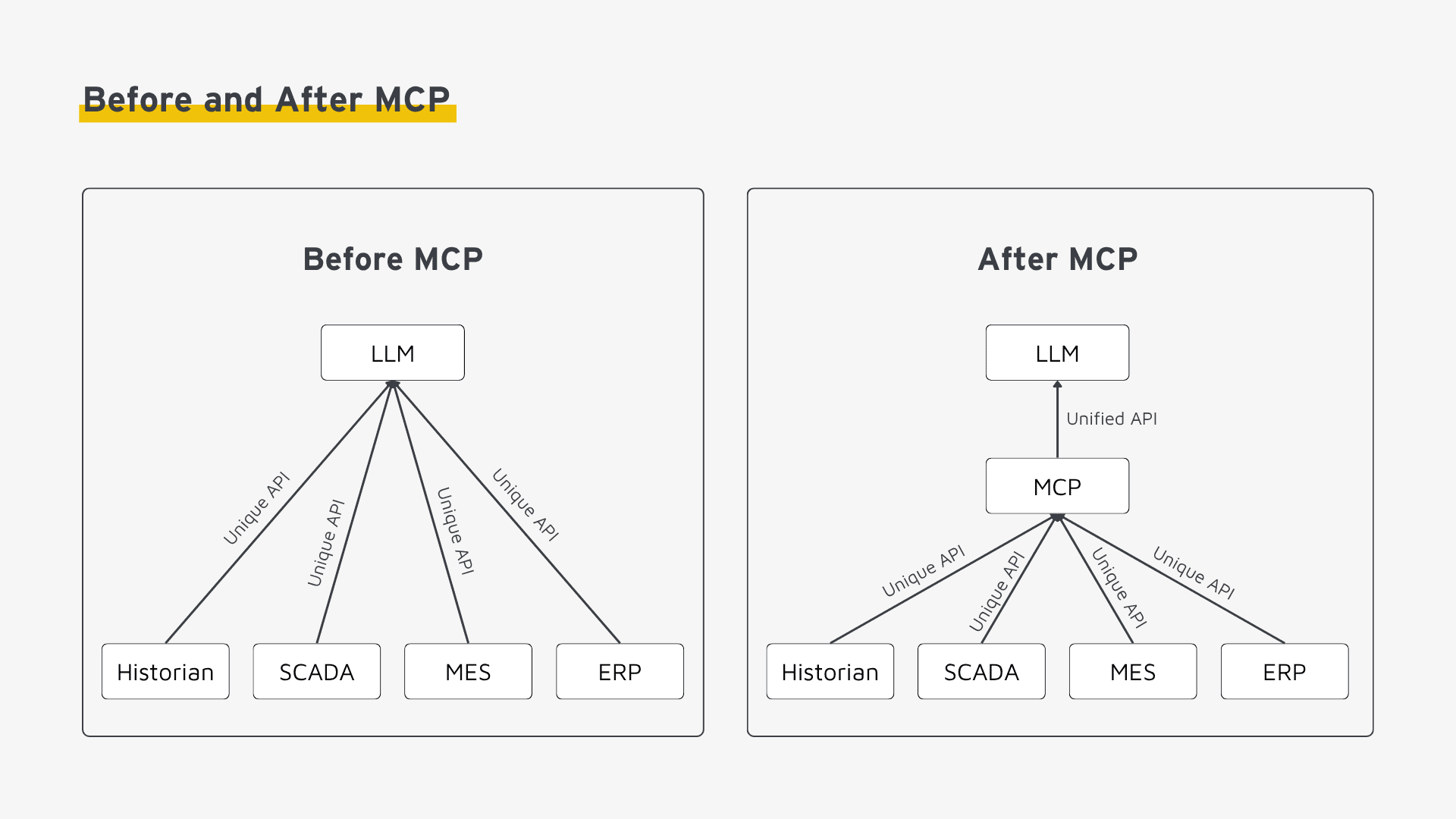
An analogy makes the core idea easier to grasp. USB-C replaced a maze of proprietary charging cables and adapters with one universal connector. MCP follows the same principle for AI systems. Instead of wiring each data source individually to a specific model, it provides a unified interface. Any compatible AI application can then use that interface.
How MCP Differs from Classic APIs
MCP is not a replacement for REST or GraphQL. Rather, it operates on a different layer. A classic API exposes a fixed set of endpoints. A developer knows these endpoints at build time and hard-codes them into an application. MCP, by contrast, describes at runtime which capabilities a server offers. As a result, an AI model discovers these capabilities dynamically. Nobody needs to reprogram the integration with every change. Internally, MCP can still call REST APIs or database connections. It simply adds a standardized description and discovery layer on top of them.
The Architecture of MCP
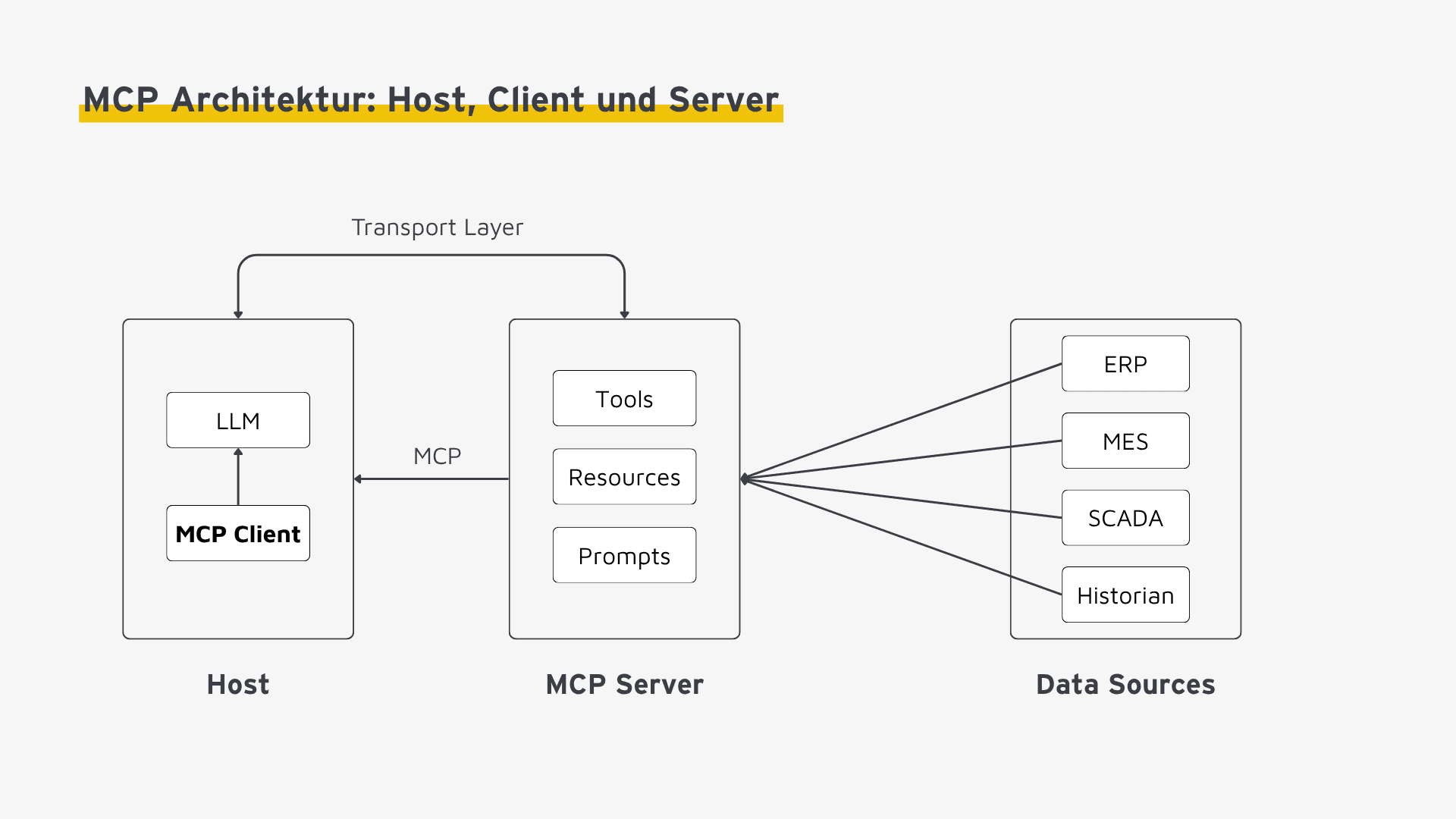
The architecture of the Model Context Protocol (MCP) follows a clear role model. Three components make up that model: host, client, and server.
Host, Client, and Server
- MCP Host: The AI application that runs the model—for example, a chat interface, an IDE extension, or an agent framework. The host coordinates one or several client connections.
- MCP Client: A component inside the host that maintains exactly one 1:1 connection to an MCP server. Consequently, a separate client exists for every server the host talks to.
- MCP Server: A program that exposes data or functions from a specific source—such as a file system, a database, or an external API—through MCP.
Communication Foundation: JSON-RPC 2.0
Client and server exchange messages using JSON-RPC 2.0, a lightweight, text-based protocol for remote procedure calls. Every request carries a method and its parameters, while every response returns a result or an error message. This choice keeps the implementation intentionally simple, since JSON-RPC is language-agnostic and works in virtually any programming language.
Transport Mechanisms
MCP supports two transport options, depending on where the client and server run:
- stdio (Standard Input/Output): Used for local servers that run as a subprocess on the same machine. Client and server communicate directly through standard input and output, avoiding any network overhead.
- Streamable HTTP: Used for remote servers reachable over a network. This transport supports bidirectional communication and therefore suits servers accessed by multiple clients at once.
Session Lifecycle and Capability Negotiation
When a connection opens, client and server negotiate their supported capabilities in a step known as capability negotiation. The server announces which tools, resources, and prompts it offers. In turn, the client reports which functions the host supports, such as the ability to prompt the user for confirmation. Only after this initialization phase does the actual exchange of data and function calls begin.
The Core Building Blocks (Primitives) of MCP
The Model Context Protocol structures communication around three central building blocks, commonly referred to as primitives.
| Primitive | Description | Example |
|---|---|---|
| Tools | Executable functions that the AI model can call | search_files, create_ticket |
| Resources | Data sources made available to the model as context | A configuration file, a database schema |
| Prompts | Predefined, reusable query patterns | A template for code reviews |
Tools: Giving the Model the Ability to Act
Tools are functions with a defined schema for input and output parameters. At runtime, the model decides whether to call a tool and with which parameters. The server then validates those parameters and performs the actual action. Because tools support both read and write operations, they cover everything from a simple query to creating a new record.
Resources: Context Without Function Calls
Unlike tools, resources trigger no action; instead, they simply supply data—comparable to a GET request without side effects. For example, a server can expose a file’s contents, a database schema, or log entries as a resource. The model then loads that resource into its context whenever needed.
Prompts: Standardized Query Patterns
Prompts are predefined templates for recurring requests. Instead of having every user write out the same complex prompt by hand, the server provides it as a template with placeholders for variable parameters. As a result, inconsistencies decrease, and proven query patterns become reusable across a team.
A fourth, more advanced concept is sampling. It lets a server send a request back to the host’s language model when needed, for instance to have the AI evaluate an intermediate step. That said, tools, resources, and prompts remain the building blocks that matter most for getting started with MCP.
Design Principles Behind the Model Context Protocol (MCP)
Several recurring design decisions sit behind this architecture, and together they explain why MCP is built the way it is.
Standardization Instead of Point-to-Point Integration
The central goal of the Model Context Protocol (MCP) is to eliminate the n×m integration burden described above. A server vendor implements MCP once. Every MCP-compatible host can then use that server without building a custom integration. Conversely, every host immediately benefits from all available MCP servers, without writing separate code for each one.
Security and User Control
MCP is designed so that a model never gains access implicitly. The host decides which servers to connect. Particularly for tool calls that write data, it can also require explicit user confirmation before an action executes. Notably, this control lives outside the protocol itself. Instead, the responsibility rests squarely on the host implementation.
Modularity and Composability
Servers operate independently of one another and combine freely. A host can connect to a file system server, a database server, and a ticketing server at the same time. None of these servers needs to know the others exist. This loose coupling, in turn, brings a practical benefit. Teams can swap out or extend individual servers without touching the rest of the integration.
Runtime Discoverability
When a connection opens, an MCP client actively queries which tools, resources, and prompts a server offers. Capabilities are therefore discovered dynamically rather than hard-coded. If a server vendor changes its functions, the host code needs no adjustment. Instead, the model simply recognizes the new capabilities the next time it connects.
Model Agnosticism
MCP makes no assumptions about which AI model is in use. Once implemented, an MCP server keeps working no matter which model the host runs—Anthropic, OpenAI, or an open-source alternative. This, in turn, decouples integration work from the choice of language model.
Where MCP Is Used in Practice
MCP servers already exist for a wide range of use cases. Development environments use them to access version control systems and ticketing tools. Research assistants use them to connect knowledge bases and document stores. Business applications use them to automate recurring workflows. Across all of these examples, the same pattern repeats: a server encapsulates access to a data source, and a host connects to it from any compatible AI model.
The protocol is also gaining traction in industrial settings, for example as an integration layer between AI systems and the Unified Namespace (UNS). One example shows how an MCP server acts as a mediator between AI agents and a broker-based UNS architecture. It covers the reference architecture, tool design, and security model in detail. For a closer look, see this article on a practical UNS application.
Recommendations for Getting Started
Do
- Start small: Set up a single MCP server for one clearly scoped use case before combining several servers.
- Design tools around business operations: Align tools with operations a subject-matter user can follow, rather than with raw database columns or API endpoints.
- Plan the security model from day one: Decide which tool calls require explicit user confirmation before the server goes into production.
Avoid
- Overly granular tools: A separate tool for every database column produces an unwieldy number of functions. That, in turn, makes it harder for the model to choose correctly.
- Overly generic tools: A single tool that accepts arbitrary database queries bypasses the validation and control layer that MCP is meant to provide.
- Unconfirmed write access: Tools that modify data or trigger actions should never run without asking the user first.
Conclusion
The Model Context Protocol (MCP) closes a structural gap. It connects AI models to the data sources, tools, and systems they need to work with. Instead of building every integration from scratch, an open standard provides a shared language. Any compatible host and any compatible server can understand that language. Three takeaways stand out:
- Clear separation of roles: The host-client-server model cleanly separates the AI application, the connection logic, and the data source. As a result, each component can evolve independently.
- Three simple building blocks: Tools, resources, and prompts cover the interaction patterns that matter most between a model and the outside world. Neither requires the complexity of a full API specification.
- Standardization reduces integration effort: Once built, an MCP server works with any MCP-compatible host, regardless of the underlying language model.