
Machine data is born on the shop floor. However, it often unlocks its full value only in the cloud. This is because cross-plant analytics, OEE metrics and AI models need a central, scalable data foundation. This is exactly where Snowflake Integration in Industrial IoT comes in. Snowflake is first a cloud data warehouse. Specifically, it merges OT data from production with IT data from ERP and MES. As a result, a shared basis for reporting, analysis and machine learning emerges.
This article first shows where Snowflake sits in a modern data architecture. Next, it describes the four technical paths for data ingestion. It also explains the UNS-native route over MQTT and gives clear criteria for the choice between batch and streaming. The intended audience is IT/OT architects, data engineers and digitalization leads in manufacturing.
Where Snowflake sits in the UNS architecture
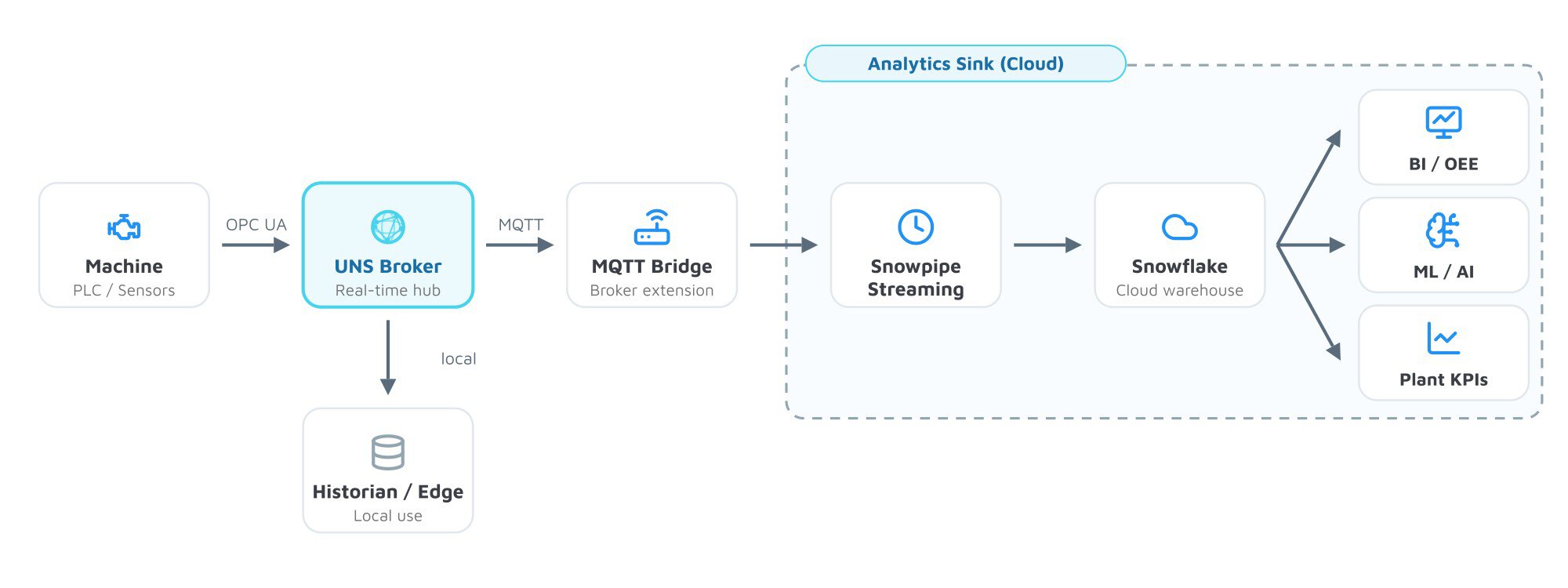
A Snowflake Integration replaces neither the broker nor the historian. Instead, Snowflake sits as an analytics sink behind the UNS layer. The Unified Namespace (UNS) therefore remains the central real-time hub. It distributes machine data to all consumers via MQTT. Snowflake is thus one of these consumers, namely the analytical one.
The data flow is therefore clear. First, sensors and controllers publish into the UNS via OPC UA or MQTT. From there, the data branches. One branch stays local at the edge, while a second branch flows into the cloud. Snowflake finally sits at the end of this second branch. There it serves analysis, not control.
This separation matters. The UNS serves real-time use cases with low latency. Snowflake serves analytical use cases over long time spans. Both layers have different jobs. They complement each other instead of competing.
A key driver of the Snowflake Integration is IT/OT data convergence. In manufacturing, data often lives in separate silos. For example, machine data sits in controllers and historian systems. Order and material data, in contrast, lives in ERP and MES. Only the merge, therefore, enables meaningful metrics. Snowflake offers the central, elastically scalable platform for this. In addition, compute and storage scale separately and on demand.
Snowflake vs. data historian – complement, not replacement
A data historian and Snowflake solve different problems. First, the historian sits close to the asset. Specifically, it captures high-frequency time series, ensures data integrity and compresses raw signals efficiently. It is thus optimized for local availability and fast queries.
Snowflake, in contrast, is designed for cross-plant use. It joins machine data with ERP, MES and quality data. On top of that run OEE calculations, reporting and ML models. Comparing the roles of a time-series database and historian in the UNS reveals the pattern. The historian is therefore the ingestion layer on the shop floor. Snowflake, meanwhile, is the analytics layer above it. Together they finally form a complete picture.
The four paths machine data takes into Snowflake
For a Snowflake Integration, there are four established methods. They differ in data form, latency and effort. The right choice depends on the use case.
Staging and COPY INTO
The classic path first uses an object store as a buffer. Machine data lands there as files in S3, Azure Blob Storage or Google Cloud Storage. Snowflake then accesses it through an External Stage. The stage is a named reference to your bucket. Authentication, in addition, runs via a Storage Integration, not via embedded credentials. Bucket and Snowflake account should also sit in the same cloud region.
The COPY INTO command then loads the files into a table. It runs manually or on a schedule on a warehouse. This path suits historical backfills and large batch loads well. The object store acts as a landing zone here. How this staging layer looks in practice is shown in the article on AWS S3 integration.
Snowpipe
Snowpipe automates exactly this load process. It watches an External Stage for new files. As soon as a file arrives, Snowpipe loads it serverlessly into the target table. A dedicated warehouse is not needed for this.
Snowpipe works file-based and in micro-batches. Typical latency is around one to three minutes. It therefore suits regular but not time-critical data flows. You can think of Snowpipe as an automated COPY INTO.
Snowpipe Streaming
Snowpipe Streaming, in contrast, takes a different approach. It works row-based instead of file-based. Through the Snowflake Ingest SDK, applications write individual rows directly into tables. Intermediate files in the object store are thus eliminated entirely.
This cuts latency drastically. As a result, data becomes available in the sub-second range. For telemetry and IoT events, this is consequently the fitting path. Continuous readings flow into analysis without a detour. For most machine data in Snowflake, Snowpipe Streaming is therefore the first choice.
Snowflake Connector for Kafka
Many industrial environments use Apache Kafka as an event backbone. The Snowflake Connector for Kafka bridges both worlds. Internally, it uses Snowpipe Streaming. Per Kafka partition, it opens its own channel and writes the rows via insertRows.
The connector thus inherits the low latency of the streaming approach. Anyone already running Kafka integrates Snowflake without an extra pipeline. The distinction between Kafka and MQTT in Industrial IoT helps answer when this path pays off.
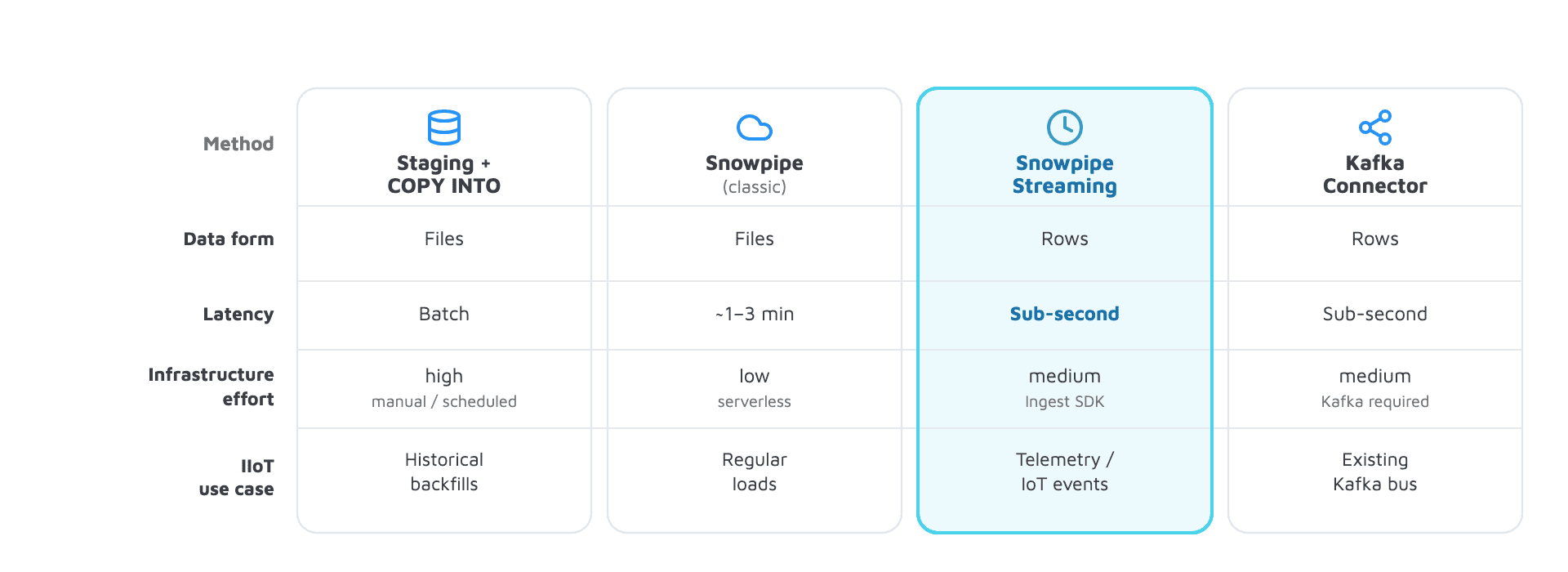
The table below summarizes the four methods. It provides the factual basis for choosing the right ingestion path.
| Method | Data form | Latency | Typical IIoT use case |
|---|---|---|---|
| Staging + COPY INTO | Files | Batch, manual/scheduled | Historical backfills, large loads |
| Snowpipe | Files | Micro-batch, ~1–3 min | Regular, non-time-critical flows |
| Snowpipe Streaming | Rows | Sub-second | Telemetry and IoT events |
| Kafka Connector | Rows | Sub-second | Existing Kafka event backbone |
The UNS- and MQTT-native route into Snowflake
In the Unified Namespace, machine data already exists as MQTT messages. A Snowflake Integration can therefore tap this stream directly. An MQTT bridge first reads from the broker and writes to Snowflake via Snowpipe Streaming. The UNS thus stays the source of truth. Snowflake, consequently, becomes the downstream consumer.
Several broker vendors offer ready-made building blocks for this. For example, the HiveMQ Enterprise Extension for Snowflake forwards messages via the Snowpipe Streaming SDK. EMQX, in contrast, supports two modes. It can, for instance, load in batch via stage and pipe, or use the Snowpipe Streaming API directly. Both solutions also keep the configuration in the broker.
Sparkplug B with Cirrus Link and Ignition
A special case is the IoT Bridge for Snowflake from Cirrus Link. It works with Ignition and MQTT Sparkplug B. Sparkplug encodes payloads as Protobuf. The bridge converts these into JSON and writes them via the Snowpipe Streaming SDK. Details on the protocol are explained in the article on Sparkplug B and its pros and cons.
The bridge flattens the data into device-oriented “As-Of” views. These show the last known state of a given device. Sparkplug also works on the report-by-exception principle. It sends only on actual changes. That reduces data volume significantly. For non-Sparkplug sources, the bridge offers a raw MQTT mode.
Batch vs. streaming: which latency does which use case need
Not every use case, however, needs sub-second latency. The choice between batch and streaming is rather a trade-off. It follows, instead, the need of the use case, not what is technically possible.
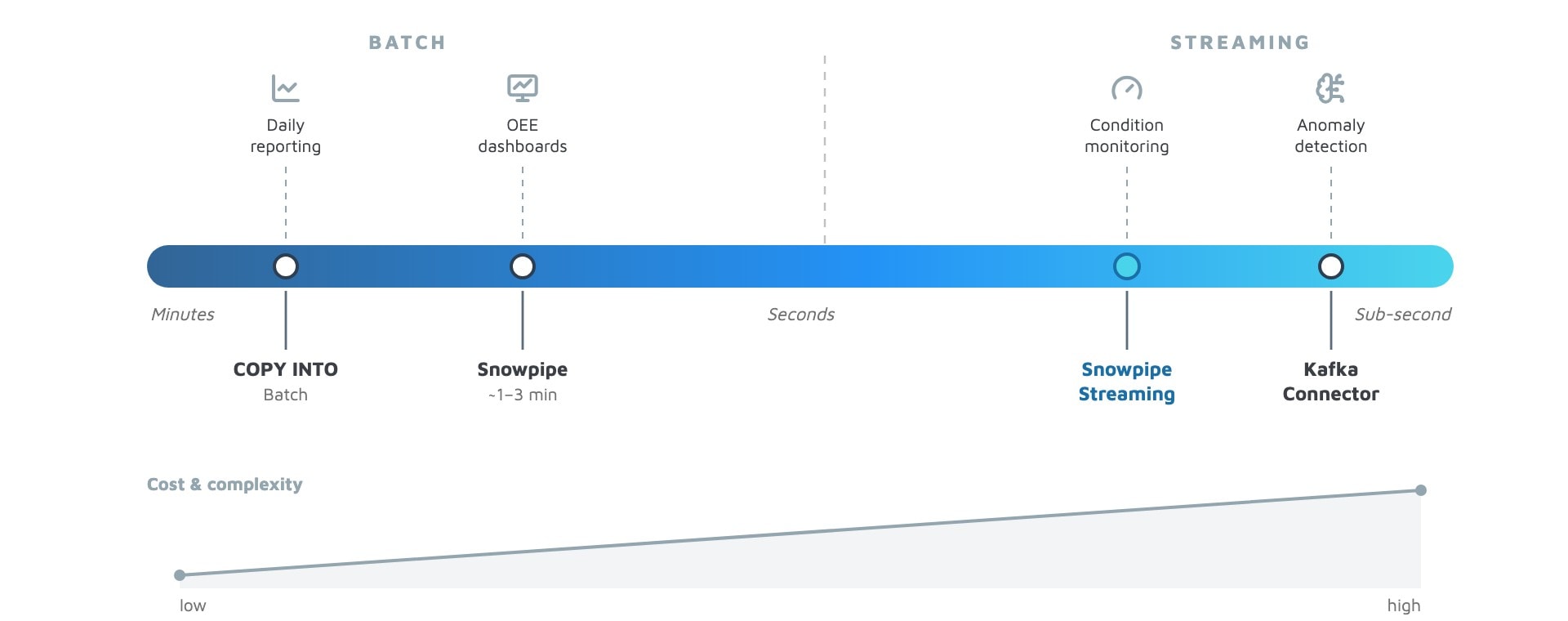
Daily reporting and OEE dashboards, for example, are well plannable. They evaluate spans of hours or days. Here a batch load with COPY or Snowpipe is therefore enough. A latency of minutes thus plays no role.
For condition monitoring and anomaly detection, in contrast, the case is different. Here every second counts. A model must therefore react to fresh readings. For that it needs Snowpipe Streaming or the Kafka Connector. Cost and complexity, moreover, rise toward streaming. Whoever estimates the need realistically thus avoids unnecessary effort.
A good rule of thumb helps with the classification. Ask first how fresh the data must be. A daily KPI tolerates minutes of delay easily. An alert on a threshold breach does not. Many architectures combine both paths. Critical signals run over streaming, plannable evaluations over batch. This mix keeps the cost of the Snowflake Integration in check.
Data modeling and context in Snowflake
Raw machine data alone is not enough. Only context, however, makes it analyzable. Snowflake offers fitting tools for this. For example, semi-structured JSON data is stored by the VARIANT data type. This way, nested MQTT payloads land in a table without a rigid schema. Queries later access individual fields in a targeted way.
For continuous preparation, Dynamic Tables are suitable. They transform raw data automatically into analysis-ready structures. The transformation runs declaratively and incrementally. New rows flow in without manual orchestration. From raw VARIANT input, a clean, queryable fact table emerges.
The decisive step is finally enrichment with context. A reading needs a reference to asset, line and site. The UNS already supplies this context via an ISA-95-oriented structure. Specifically, the topic hierarchy encodes site, area and machine.
How to model it cleanly is shown in the guide to data modeling in the Unified Namespace. Carrying this context through the Snowflake Integration thus turns raw data into reliable metrics. It is also worth a look at Industrial DataOps in the Unified Namespace. That, in addition, covers governance and quality of the data flows.
Conclusion and typical mistakes
The Snowflake Integration in Industrial IoT succeeds when the roles are clear. Snowflake is thus the analytics and AI layer behind the UNS. Moreover, it complements broker and historian instead of replacing them. The fitting ingestion path finally follows the required latency. For IoT telemetry, Snowpipe Streaming is therefore usually the right choice.
In practice, three mistakes come up again and again. These key takeaways sum them up.
- Snowflake is no historian replacement: Replacing the asset-near capture with the warehouse loses real-time proximity and integrity. Both layers have their own jobs.
- Not every raw message belongs in streaming: Streaming all messages unfiltered drives up cost and volume. Filtering and report-by-exception keep the load low.
- No analysis without context: Machine data in Snowflake without asset reference stays numbers without meaning. The ISA-95 context from the UNS makes it usable in the first place.