
In modern industrial environments, the combination of Allen Bradley controllers and MQTT plays a critical role to bridge OT and IT systems. Allen Bradley controllers from Rockwell Automation are well established for their reliability and performance in industrial automation. This is particularly true for discrete manufacturing and process industries worldwide. MQTT, in turn, provides the event-driven, scalable messaging layer that connects the shop floor to enterprise IT. As Rockwell’s installed base continues to grow alongside the adoption of MQTT, the demand for a seamless integration path between both technologies is accelerating — especially within Unified Namespace (UNS) architectures. The following step-by-step guide walks through how to successfully implement the integration of Allen Bradley and MQTT.
Integration Options for Allen Bradley and MQTT
Connecting an Allen Bradley controller to an MQTT broker can be achieved via three primary approaches: through a gateway, via direct communication using an MQTT Add-On Instruction (AOI) deployed on the controller, or through an OPC UA server interface. The right choice depends on the specific use case requirements and the existing infrastructure. A detailed comparison of the trade-offs for each approach is available here.
Option 1: Integration via Gateway
The most widely adopted approach for integrating Allen Bradley and MQTT is the use of a gateway — either software- or hardware-based. The gateway acts as a protocol bridge between the controller and the MQTT broker: it communicates with the Allen Bradley controller via the native EtherNet/IP protocol, reads the relevant controller tags, transforms the data into MQTT messages, and publishes them to the broker. This method is particularly well suited for brownfield environments where legacy controllers (e.g., MicroLogix, PLC-5) lack native OPC UA or MQTT capabilities.
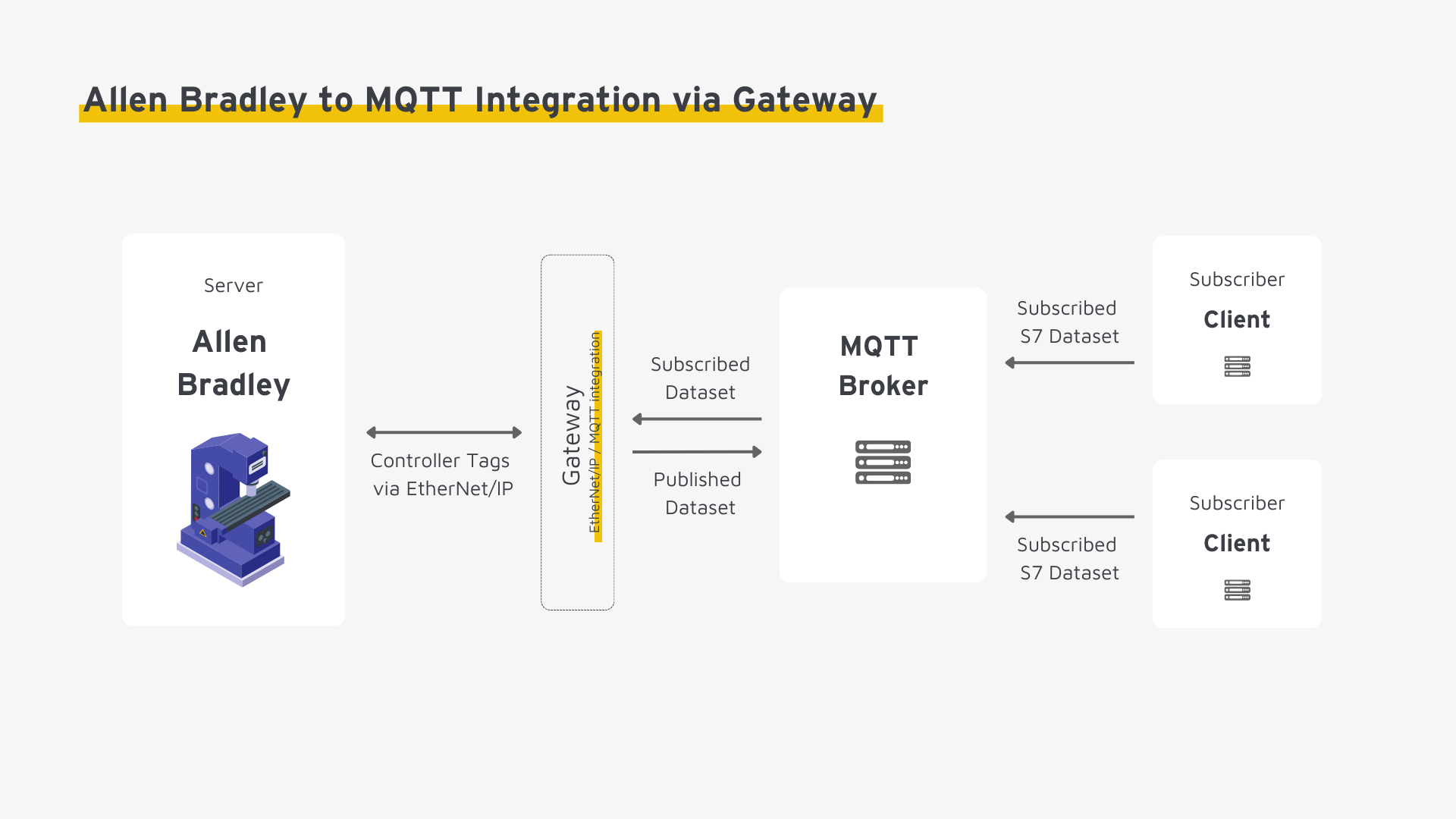
Rockwell’s official software solution, FactoryTalk Optix, can also fulfill this gateway role, enabling seamless integration between Allen-Bradley controllers and MQTT. Learn more on the official website.
Option 2: Integration via MQTT Add-On Instruction (AOI)
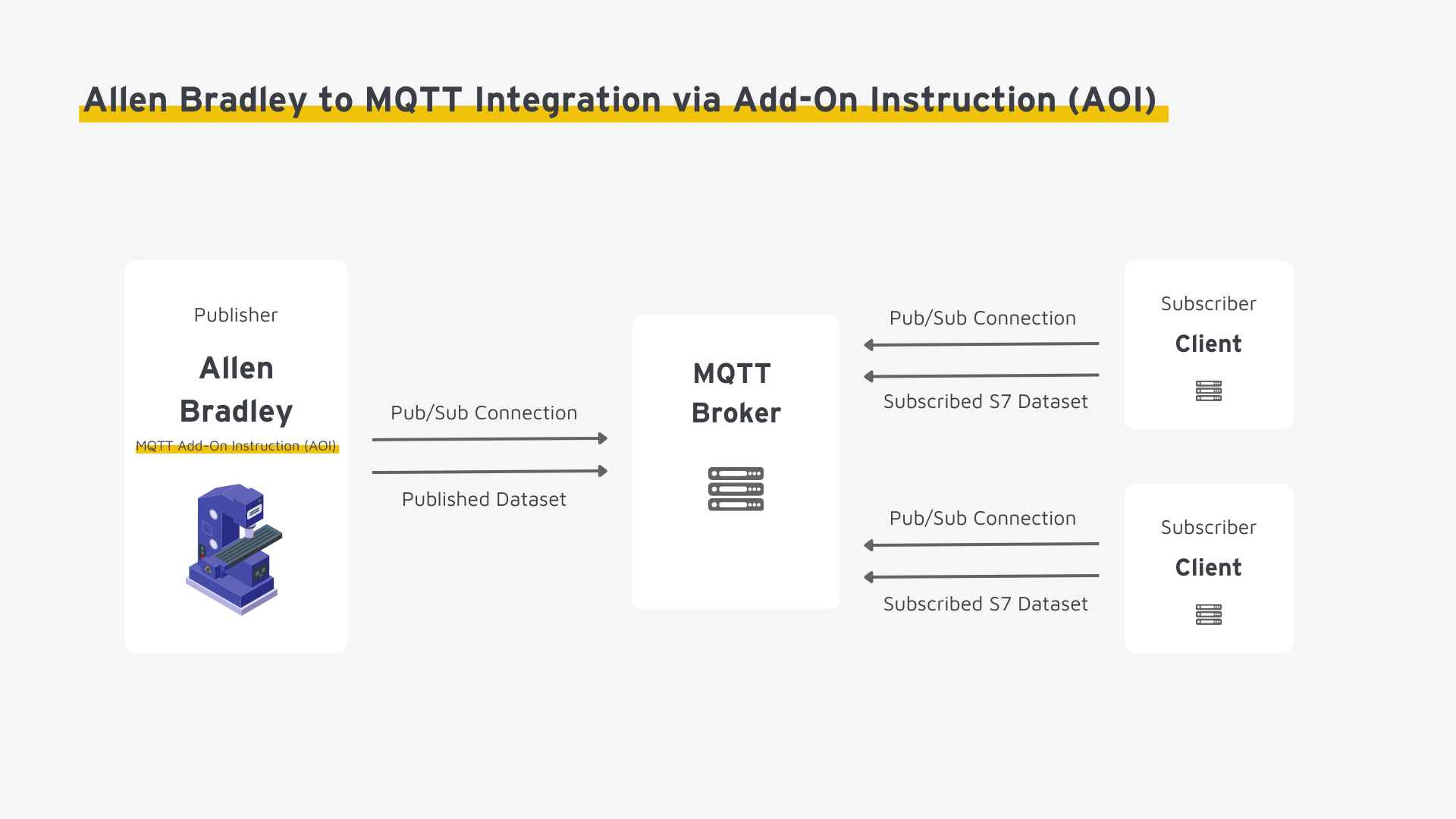
An alternative approach is the use of an MQTT Add-On Instruction (AOI) implemented directly in Studio 5000 Logix Designer. This custom function block enables the controller to establish a direct TCP/IP connection to the MQTT broker — eliminating the need for an intermediate gateway. The AOI handles message formatting and publication natively from the controller. However, this approach demands available PLC engineering resources and sufficient CPU headroom, which makes it less practical for brownfield deployments where engineering capacity is typically constrained.
Option 3: Integration via OPC UA Server
Where the Allen Bradley controller exposes an OPC UA server interface — as is the case with newer ControlLogix and CompactLogix platforms — it is possible to bridge OPC UA and MQTT. In practice, this integration is realized in one of two ways: via a gateway that translates between the protocols, or through native OPC UA over MQTT communication. Detailed information and a step-by-step guide for this approach are available here.
Step-by-Step Guide: Allen Bradley and MQTT Integration via Gateway
The following steps outline the end-to-end process for connecting an Allen Bradley controller to an MQTT broker through a gateway.
Step 1: Prerequisites and Infrastructure Review
Assess the existing infrastructure and ensure the necessary access rights and system configurations are in place before initiating the integration of Allen Bradley and MQTT.
- Select a gateway: Verify that the gateway natively supports both the EtherNet/IP protocol (CIP) and MQTT. Evaluate compatibility with other relevant systems in your OT/IT landscape (e.g., additional controllers, ERP). Confirm that the gateway meets your security requirements and can fulfill operational demands such as redundancy and horizontal scalability.
- Validate infrastructure readiness: Confirm that both the controller and the MQTT broker are fully operational, and provision a dedicated test environment. This allows you to validate the integration and iterate on configuration changes without risk to the production system.
- Configure the network: Adjust your network topology to enable communication between all components. This includes firewall rules and port configurations. EtherNet/IP uses port 44818 (TCP) for explicit messaging and port 2222 (UDP) for implicit I/O communication.
- Access and permissions: Ensure you have administrative access to the controller, MQTT broker, and gateway. Install the required engineering software — Studio 5000 Logix Designer or RSLogix 5000 — as needed.
Step 2: Identify Relevant Controller Tags
Audit the Allen Bradley controller to confirm that all relevant data points (controller tags) are available and correctly configured. Unlike many other PLC platforms, Allen Bradley controllers use a symbolic, tag-based addressing model — each data point is identified by a unique name rather than a fixed memory address.
- Identify controller tags: Determine which tags are in scope for your use case — such as sensor readings, status flags, or setpoints. Tags are scoped either at the controller level (Controller Tags, globally accessible) or at the program level (Program Tags). For gateway-based integration, Controller Tags are generally preferred as they are accessible across all programs.
- Verify data types and attributes: Confirm that each tag is assigned the correct data type (e.g., REAL, DINT, BOOL, UDT) and is properly configured in the controller. Ensure that the gateway is permitted to read tags externally — check controller security settings if necessary.
Step 3: Define the MQTT Namespace
While Allen Bradley controllers define their address space through the tag-based model on the controller level, the MQTT namespace is a shared contract between publishers and subscribers. Establishing a well-structured, standardized namespace is a prerequisite for scalable and interoperable MQTT communication. This step covers:
Standardize the MQTT topic hierarchy: MQTT topics are UTF-8 strings that define the path under which messages are published. Publishers write data to a topic; subscribers consume messages by subscribing to matching topic patterns. Define enterprise-wide topic naming conventions that enforce a consistent, hierarchical structure — ideally aligned with your Unified Namespace design (e.g., site/area/line/machine/tag).
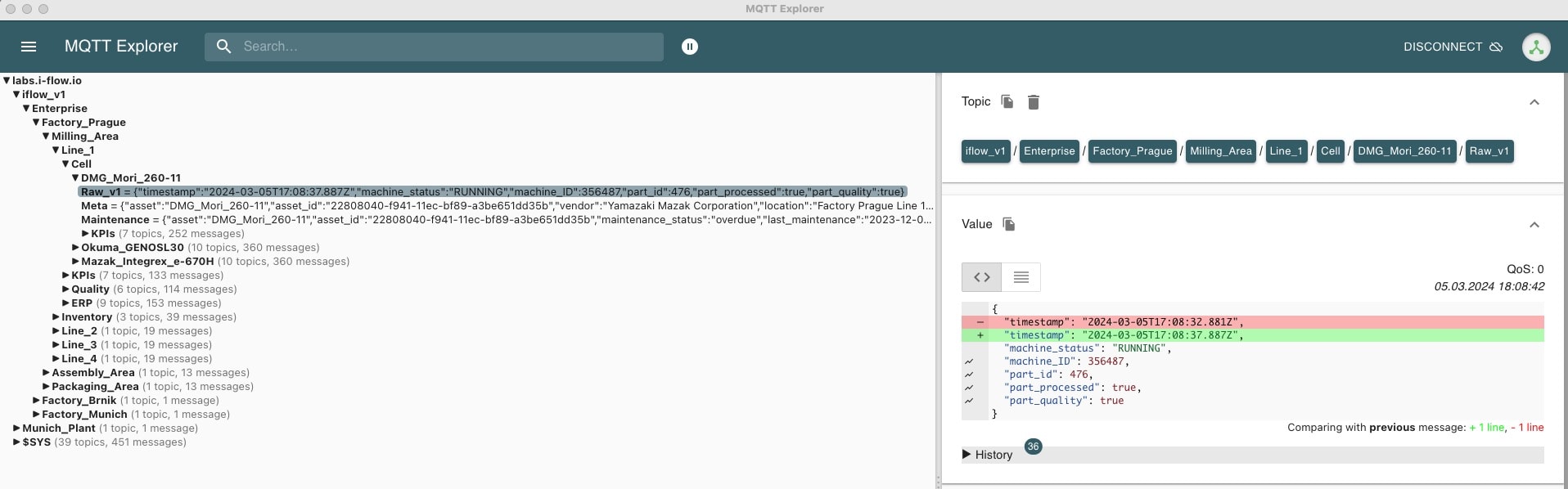
Standardize the MQTT message payload: A consistent payload schema is essential for interoperability — especially in mixed-vendor environments. Define a canonical data model that specifies:
- A uniform payload structure including contextual metadata (e.g., asset name, machine type) and their representation within the MQTT topic hierarchy
- A standardized serialization format such as JSON or Protobuf to enable consistent downstream processing across all consumers
- Explicit data types and naming conventions for all tags to eliminate ambiguity in downstream systems and data pipelines
Step 4: Map Controller Tags to the MQTT Namespace
In this step, you configure the gateway to establish live communication between the Allen Bradley controller and the MQTT broker, translating controller tags into standardized MQTT messages.
- Connectivity test: Verify end-to-end reachability across all components — the Allen Bradley controller, the gateway, and the MQTT broker must be able to communicate. Confirm that authentication (e.g., username/password or client certificates) and transport encryption (TLS) are correctly configured before proceeding.
- Map MQTT payloads: Map controller tag values to the data model defined in Step 3. Supplement the payload with static fields — such as machine type or site ID — directly within the gateway where these cannot be derived from the controller.
- Map MQTT topics: Define the topic path under which each controller tag will be published. Simple use cases allow a direct 1:1 mapping from tag name to topic segment. More complex scenarios may require multi-stage transformation logic or dynamic topic construction.
- Implement transformation logic: Configure all necessary data conversions within the gateway: engineering unit scaling (e.g., raw sensor values to physical units), type conversions (e.g., DINT to integer), and where required, aggregation of multiple tags into a single structured payload.
Step 5: Validate the Integration in a Test Environment
- Define message delivery behavior: Specify the trigger condition for MQTT publishes. Report by Exception (RBE) – publishing only on value change. This is generally preferable over fixed polling cycles, as it significantly reduces network load while improving real-time responsiveness. Also configure QoS levels and the Retain flag to match the consumption patterns of your subscribers.
- Validate data integrity: Trace the full data path end-to-end in the test environment: Are tags returning accurate values? Are payloads being delivered to the MQTT broker with the correct structure and format? Do authentication and encryption hold across the entire communication chain?
Step 6: Go-Live and Operational Monitoring
- Production rollout: After successful validation, transition the integration to the production environment incrementally. Schedule the rollout during planned maintenance windows or off-peak hours to minimize disruption to ongoing operations.
- Set up monitoring: Establish continuous monitoring for gateway connectivity, MQTT broker health, and message throughput. Configure alerting thresholds that automatically trigger notifications on connection failures, message delivery anomalies, or broker performance degradation.
- Logging and diagnostics: Enable structured logging at both the gateway and broker level. Well-structured logs are essential for efficient troubleshooting and serve as the foundation for ongoing performance optimization of the integration.
Step-by-Step Guide: Allen Bradley and MQTT Integration via MQTT Add-On Instruction (AOI)
Since the fundamental steps largely overlap with the gateway approach, the following provides a condensed walkthrough. Note: Due to the engineering effort required and the typically limited availability of PLC programmers, this method is often not the most practical choice in brownfield environments.
- Verify prerequisites: The following conditions must be met before implementing an MQTT AOI on the controller.
- PLC engineering resources: Implementing and maintaining the AOI requires Studio 5000 Logix Designer expertise. Ensure qualified personnel are available for both initial deployment and ongoing support.
- Hardware and firmware compatibility: Confirm that the controller (e.g., ControlLogix L8x, CompactLogix 5380) has sufficient CPU and memory resources to run the AOI. TLS-secured communication requires a current firmware version — verify compatibility before proceeding.
- Engineering environment: Studio 5000 Logix Designer (version 30 or later recommended) is required.
- Network interface: The controller must have an Ethernet interface capable of establishing direct outbound TCP/IP connections to the MQTT broker.
- Open or create a Studio 5000 project: Open the existing project or create a new one in Studio 5000 Logix Designer for your ControlLogix or CompactLogix CPU. Configure the Ethernet interface IP address to ensure the controller is reachable within the same subnet as the MQTT broker.
- Import the MQTT AOI: Import the MQTT Add-On Instruction into your project. Navigate to the Add-On Instructions section in Studio 5000 and add the AOI to the project.
- Create controller tags: Define the required controller tags for the TCP/MQTT connection parameters — broker address, port, client ID, and topic path — as well as tags for the messages to be sent and received.
- Integrate the AOI into the main routine: Insert the MQTT AOI into your main program (e.g., MainRoutine) and wire the required controller tags to the corresponding AOI input and output parameters.
- Configure MQTT and security: If TLS encryption is required, import the MQTT broker’s certificate into the controller. Configure the AOI parameters to reference the certificate and enable secured communication.
- Test the integration: Set all connection parameters in the controller tags, download the updated program to the CPU, and initiate the connection to the MQTT broker. Verify that messages are published correctly and that the broker acknowledges the connection.
Conclusion
A well-executed integration of Allen Bradley and MQTT lays the architectural foundation for seamless OT/IT connectivity. The choice of integration method is ultimately driven by the existing infrastructure and available engineering resources. In brownfield environments with established ControlLogix or CompactLogix deployments, the gateway approach is typically the most pragmatic path. However, the long-term success of the integration hinges on a consistent, enterprise-wide mapping of controller tags to a standardized MQTT namespace. This needs to be applied uniformly across plants and controller generations. Only with this level of consistency can the integration of Allen Bradley and MQTT scale.